Read the incoming direction before attacking back. When using the directional HUD, the orange shield is the cue to practice Perfect Block.
Difficulty settings: check your achievement goal first
For Uphill Battle, keep the Duelist preset throughout a full qualifying playthrough. PowerPyx reports that lowering it or changing its modifiers to Custom invalidates the requirement; switching back only for the ending does not work. The two early endings do not qualify.
For ordinary practice, open Gameplay → Combat → Difficulty Preset. The presets are Story, Fair, Challenging and Duelist. ATH distinguishes Action difficulty (attack pace and block timing) from RPG difficulty (combat statistics), so inspect the setting that matches your problem.
- Check whether you are missing the attack-direction cue or mistiming the block.
- Outside a Duelist achievement run, inspect Directional Indicator and Auto Block. ATH describes Auto Block as allowing wrong-direction defence at a stamina cost; this is not proof of a Perfect Block.
- Confirm the resulting preset and practise the input again. Do not assume changing only one toggle leaves Duelist unchanged.
Exact timing windows and numerical difficulty multipliers remain unconfirmed here. Use your on-screen descriptions rather than another player’s damage figures.
PC bindings
Open Settings from Esc, then choose Controls. Current defaults are W/A/S/D plus left mouse for a directional attack, W/A/S/D plus right mouse for a directional block, and a movement direction plus Space to dodge. Right mouse by itself uses Omni Block.
Omni Block cannot create a perfect block and always spends stamina, so add the matching direction when practicing counters. Every PC action can be rebound; use the live Controls screen if yours differs.
Stamina empty before the counter?
ATH’s tutorial account identifies attacking, sprinting and Omni Block as stamina drains. At zero, it describes a Fatigued state with slower, weaker attacks. Avoid diagnosing every failed exchange as a direction mistake.
- Check whether you sprinted into the encounter or kept Omni Block held between attacks.
- For practice, stop adding attacks while exhausted and create space to observe recovery. This is a learning exercise, not a guaranteed safe opening.
- Repeat one block-and-counter exchange with stamina available. Compare the bar after Omni Block and correctly directed defense before extending the combo.
Turn a Perfect Block into Perfect Riposte
Perfect Riposte is a learned Swordmastery perk, not the name for every attack after blocking. Check the shrine’s skill tree first. For higher-tier manual access, Lucky Crossing leads to Ursul; buying a book alone does not purchase the skill.
- Lock onto one opponent and perform a correctly timed directional block.
- Look for the red Critical Direction, then attack in that indicated direction before the opening ends. Do not automatically reuse the direction you just blocked.
- If you dodged instead, check your learned upgrade: the database places Perfect Dodge compatibility at the third tier. A basic dodge is not a substitute for the required setup.
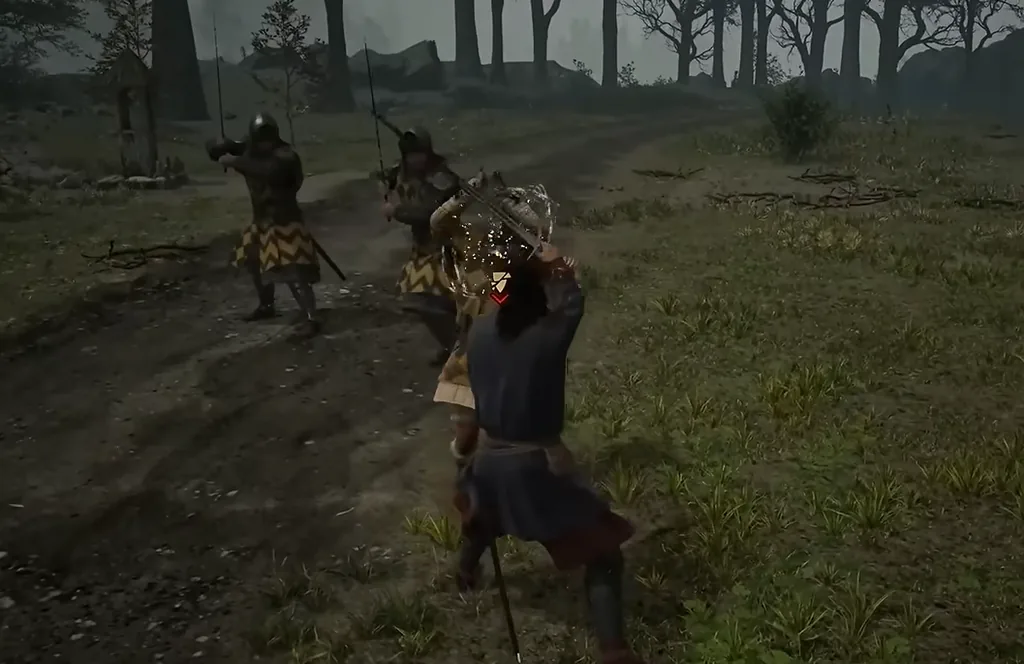
With Duelist settings, the shield timing cue may be absent; practice by reading the attack animation. If the riposte fails, check the learned perk, whether the block was perfect, and the attack direction. Exact timing in milliseconds and guaranteed multi-hit sequences remain unconfirmed; a larger damage number alone cannot diagnose the mistake.
Check a parry-focused loadout before buying more perks
ATH's Swordmaster build combines defensive resource recovery with follow-up attacks. Use it as a build idea, not a required stat sheet.
- Check the learned Perfect Block rank and its displayed effect; do not assume the first rank grants every recovery bonus listed in the article.
- Perform one timed directional block, then inspect stamina and Activation Charges separately before spending a charge.
- If guard remains costly, check the input first. If movement remains penalized, inspect each armor piece: Second Skin I and II cover different armor weights.
Fixed health totals do not prove the setup works. Confirm the equipped day/night set and learned skills on your own save.
Diagnose the failed exchange
- Only pressing right mouse: that is Omni Block. Add the matching direction for directional-block practice.
- Wrong direction: watch the attack indicator before committing your input.
- Unblockable cue: switch to a directional dodge rather than repeating block.
- Hit after dodging: as a practice drill, skip your counter and watch the follow-up first. Add an attack once you can defend that exchange.
This drill is a learning recommendation, not a guaranteed punish window or a fixed combo.
Prepare the controls
Check the game's control bindings for block, direction selection and dodge. This guide uses action names so it still works if you have remapped your controller or keyboard.
Practice one exchange at a time
- Face your opponent and watch the attack direction. Match your defense to that direction instead of holding a random guard.
- For Perfect Block practice, time the defense to the shield turning orange. Do not rely only on the sword animation.
- Dodge attacks marked unblockable. In the prologue sparring with Pieter, expect a quick swing after his unblockable move.
- Return to defense after the dodge or counter opportunity. Our beginner recommendation is to learn one clean exchange before extending an attack chain.
Still struggling?
The official Swordmastery guide confirms omniblock and omniattack alternatives that select directions for you. Try these if directional input is the barrier. This guide does not treat assisted defense as a promise that every attack can be blocked.
Check your progress
You should now distinguish normal directional defense from an unblockable attack. If you dodge the first move but take the next hit, concentrate on the follow-up instead of immediately attacking.
Read an attack before reacting
The official Swordmastery explanation distinguishes windup, anticipation, and swing phases. Watch the transition into the strike alongside the direction cue, rather than treating every raised weapon as an immediate hit.
For practice, separate ordinary directional defense from dodge-only attacks before adding counters. This is a suggested exercise: it helps identify wrong direction, mistiming, or attacking too early after a dodge.
Run a full practice loop on the Forgotten Guardian
This encounter is a practical test of the actions above. In Deep Down’s exit hall, spend the first exchange reading the Guardian rather than attacking first. Source checks show its twin blades glow with a red skull before the unblockable spinning attack; that is the signal to stop blocking and dodge sideways.
- For an ordinary directional attack, hold the matching W, A, S, or D direction and right-click. Practice Perfect Block when the shield cue turns orange; do not use right-click-only Omni Block for this drill.
- When the blades glow or the red skull appears, hold a sideways movement direction and press Space. Let the spinning move end, then face the enemy again instead of attacking from inside its path.
- After a successful block, make one attack and return to guard for the next move. This leaves room to correct an uncertain next direction; do not treat the walkthrough’s whole sequence as a required fixed hit count.
If you keep taking a hit after dodging, make your initial goal “dodge and do not attack; watch the next move.” Add one counter only once you can consistently see that follow-up. It makes it much easier to tell whether the issue is direction, timing, or attacking too early.
October combat changes: announcement, not current instructions
As of this September 25, 2026 source check, ATH's September 22 report describes an easier difficulty, stun-targeting and disengagement changes as October plans. This site has not verified a final release note or an implemented build; the exact release date and final changes remain unconfirmed.
Practice with the current prompts and instructions above. Do not plan combos around an announced targeting change yet, or treat an absent new difficulty as an installation failure. Recheck your version and the official notes when your platform receives the update.