Check Second Skin I for medium armor and Second Skin II for heavy armor, including the ranks you have purchased. Find and read the matching manual, meet the connected Swordmastery requirements, then purchase the skill. Wearing a piece of armor or carrying its book does not by itself remove the proficiency penalty.
Choose the manual for your armor class
- Select the affected armor in your inventory and read its class. Keep that same piece equipped while you check the skill so a gear change does not confuse the comparison.
- For medium armor, look for Second Skin I. Check the armorers in Maragir or Svartrau City for its manual.
- For heavy armor, look for Second Skin II. Check the armorers in Svartrau City or Tantari instead.
Confirm the full book name in the shop before buying. Exact stall coordinates, prices and restock conditions remain unconfirmed here. If the book is absent, check another listed armorer; do not spend time waiting for an unverified refresh timer or farming an assumed guaranteed drop.
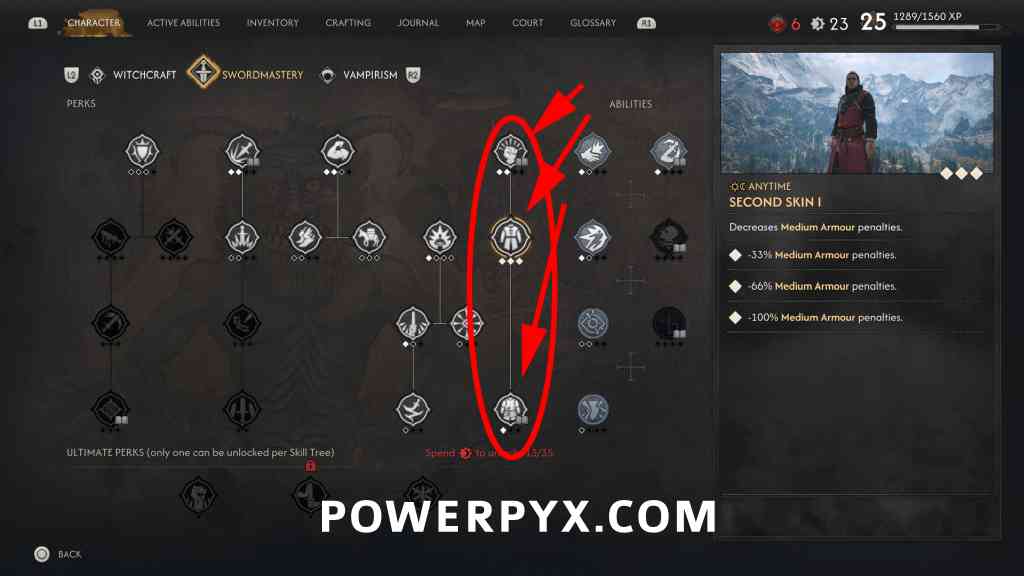
Read the book, then check the connected skill
- Open your inventory, select the matching manual and use its reading action. Return to Swordmastery and inspect the Second Skin node again.
- Check the prerequisite connected above Second Skin I. PowerPyx names it Vigour and specifies at least one point invested; ShowGamer uses Resilience. Identify it by the live tree connection and description when the language differs.
- For Second Skin II, inspect its own manual requirement and connected nodes. Do not assume that buying Second Skin I also purchases the heavy-armor perk.
- Read the remaining requirements shown by the node, then confirm the skill purchase when they are satisfied. The book clears a manual requirement; the purchase is still a separate action.
Verify the result on the same armor
Return to the armor you checked at the start and inspect its proficiency warning and affected character values. Keep the comparison to the same equipment. A changed number after swapping armor does not tell you whether Second Skin was learned.
If the warning remains, match the armor class to the purchased tier first. Then confirm that the node is learned rather than merely available to buy. For other skill requirements, follow the manual-to-skill checklist.
When the node is still locked
- Book owned, node locked: verify that you read the correct I or II manual.
- Book read, purchase unavailable: inspect the connected prerequisite and every unmet condition displayed on the node.
- Medium armor works, heavy armor does not: check Second Skin II separately.
- No book or not enough resources: compare your current equipment with its actual penalties before spending on a heavier replacement.
Use the early equipment routes when you need another item, or the Swordmastery manual guide for related skill books. Neither route replaces checking the requirements of the specific Second Skin node you want.
Still penalized? Separate armor class from perk rank
| Symptom | Check | Next step |
|---|---|---|
| Book owned, node locked | Confirm that you read the matching I / II manual. | Inspect the node again after reading. |
| Node available, no change | Check whether you actually spent the skill point. | Compare the same armor after confirming the learned rank. |
| Penalty reduced, not gone | Read the effects for each rank and your current investment. | Follow the node requirements; do not mistake the first rank for the final rank. |
| Medium works, heavy does not | Check the armor class and Second Skin II. | Inspect its manual, prerequisites and ranks separately. |
Learned Second Skin but cannot run or travel? Check weight
Armor proficiency penalties and an overfull inventory need different checks. Dawnwalker Wiki distinguishes them: Second Skin reduces the relevant armor penalty; it does not increase carrying capacity.
- Open inventory and compare total weight with the limit and any overencumbered warning. Check spare items as well as what you are wearing.
- If over the limit, use Storage at a shrine for items you want to keep but do not need now, or sell items you have decided to discard. You do not need to destroy equipment first.
- Confirm that weight is below the limit and the warning has cleared, then try running or fast travel again.
- If weight is fine but an armor warning remains, return to the I/II and purchased-rank checks above. If travel is still unavailable after unloading, inspect the destination and the current screen prompt rather than assuming Second Skin is the cause.
This is a public-source check, not firsthand testing. Overencumbrance is not the only possible reason movement or travel may be unavailable.